
Grounding Microsoft Copilot with Metadata: Preventing AI Hallucinations & Unauthorised Data Access
The Governance Challenge of Deploying Generative AI on Unstructured Files
As Australian organisations deploy Microsoft 365 Copilot to accelerate workplace productivity, CIOs, IT directors, and governance professionals are confronting a fundamental reality: Generative AI systems are only as reliable as the quality, structure, and security of the data they index.
When AI assistants are introduced across unorganised SharePoint document libraries, personal OneDrive directories, and legacy network file shares, they query all content accessible under a user’s account permissions.
Without structured metadata and automated information governance, two critical business risks quickly surface:
- Unintended Internal Data Exposure: In many organisations, SharePoint permission inheritance has drifted over years of collaborative sharing. If a folder containing executive remuneration, redundancy plans, or commercial bids was inadvertently shared with “Everyone except external users”, Copilot will index that content. When an employee asks an innocent question, Copilot can readily summarise confidential details that the employee should never have seen.
- Context Confusion from Outdated & Duplicate Versions: When an employee queries company travel policies, credit limits, or standard client contract terms, standard AI search mechanisms may draw context from obsolete drafts or superseded templates saved across disparate project folders, generating convincing yet incorrect answers.
According to research from Gartner Content Services Research, up to 80% of enterprise information is unstructured, and more than 30% of stored documents represent “ROT” (Redundant, Obsolete, or Trivial data). When an LLM ingests this ROT data, the likelihood of hallucinations and contradictory outputs increases dramatically.
What Does “Grounding” Mean for Enterprise AI?
In modern enterprise AI architecture, grounding is the process of anchoring a Large Language Model (LLM) to verified, organisation-specific reference data using Retrieval-Augmented Generation (RAG).
Rather than relying purely on pre-trained public data, grounding extracts relevant context from internal corporate records before synthesising a response.
As documented in Microsoft’s Architecture Guide for Microsoft 365 Copilot, Copilot relies on the Microsoft Graph and Semantic Index to retrieve enterprise context. Copilot strictly enforces user-level permissions at runtime; however, it cannot inherently distinguish between a high-confidence approved final contract and an unvetted draft copy if both reside within accessible directories.
Traditional folder hierarchies fail to provide this critical context:
- Folder paths lack semantic lifecycle states: A folder named
/Projects/2024/Drafts/does not programmatically inform the AI whether a contained file was formally approved, superseded, or rejected. - Filename versioning creates ambiguity: Files labelled
Contract_v2_final_FINAL_approved.docxcompete directly against the signed PDF in the retrieval window. The AI may preferentially weight the draft Word document simply because its keyword density happens to match the user’s prompt more closely.
How Metadata-Driven Governance Solves the AI Context Dilemma
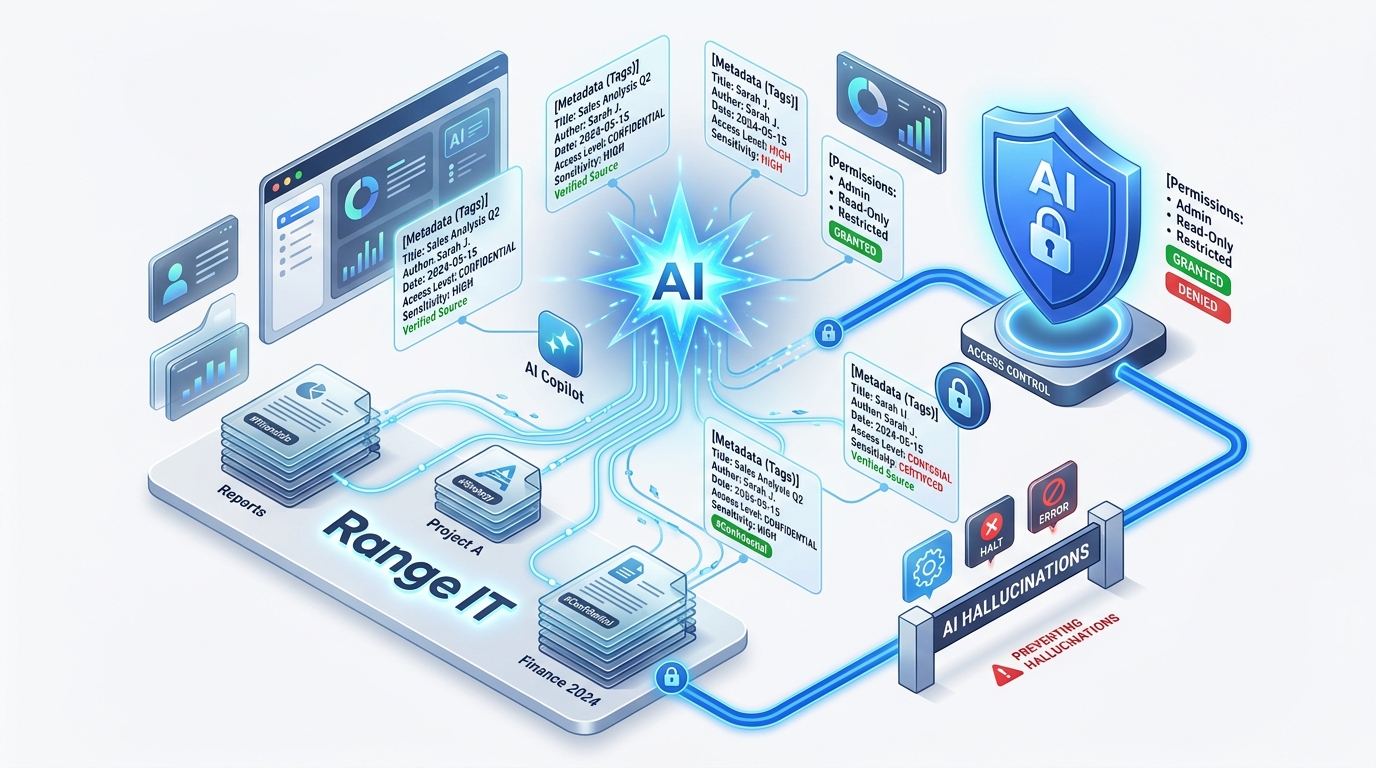
The visual architecture below illustrates how introducing an M-Files Information Governance Layer transforms unstructured data into governed, verified context before it reaches the Microsoft Copilot retrieval engine:
The Enterprise AI Grounding & Metadata Governance Pipeline
3 Pillars of Metadata-Governed AI Grounding
Through the M-Files and Microsoft strategic partnership (including deep integration with SharePoint Embedded and Microsoft 365 Copilot Studio), organisations enforce information discipline across three specific dimensions:
1. Status-Driven Information Lifecycle Management
In M-Files, documents are not static files inside inert folders; they are dynamic business objects tagged with rich lifecycle properties (e.g. Class: Client Agreement, Status: Active/Approved, Review Date: 2026-10-01).
When Copilot generates an answer, the M-Files connector applies metadata filtering at query time. The AI explicitly disregards files in Draft, Under Review, or Archived states. As a result, staff queries receive answers sourced solely from the binding, active corporate policy.
2. Attribute-Based Access Control (ABAC) & Australian Privacy Compliance
Under Australian Privacy Principle 11 (OAIC Guidance on Privacy and Commercially Available AI Products), entities have a strict legal duty to safeguard personal and sensitive information from unauthorised disclosure, including within automated AI indexing environments.
Rather than relying on brittle, manually configured folder permissions, M-Files dynamically calculates access permissions based on document metadata properties (e.g. Client Confidential, Board Level, Finance Restricted). Even if a sensitive record is co-located in a broader team repository, M-Files prevents it from ever being surfaced to unauthorized users in Copilot responses.
3. Elimination of Duplicate ROT Data (Single Source of Truth)
In traditional environments, a document is routinely attached to emails, copied into multiple project folders, and stored on personal desktops.
M-Files stores each document as a single, canonical object with an immutable audit trail. When Microsoft Copilot queries company records, it accesses one authoritative master version rather than synthesising fragments from five differing historical drafts.
Unstructured SharePoint vs. M-Files Metadata-Governed Architecture
The operational difference between deploying AI across unmanaged file stores versus a metadata-governed environment is stark:
| Architecture Dimension | Unstructured SharePoint / Network Shares | M-Files Metadata-Governed Architecture |
|---|---|---|
| Permission Management | Inherited folder trees; prone to permission drift and unintended over-sharing. | Dynamic Role-Based Access Controls (RBAC): Automatically derived from document attributes. |
| Document Lifecycle | Static folder names (/Old_Drafts/) that AI cannot reliably interpret as obsolete. | Enforced Lifecycle Status: Query connectors strictly exclude Draft, Superseded, and Archived files. |
| Deduplication | Identical files duplicated across multiple team channels confuse context windows. | Single Master Object: Complete version history attached to one verified record. |
| Hallucination Risk | High; contradictory drafts introduce conflicting parameters into the prompt. | Minimal; Model is grounded strictly with certified master context. |
| Compliance Posture | Reactive; difficult to prove which employee accessed what record via AI. | Audit-Ready: Immutable access logs tracking every document view, version change, and export. |
Practical Implementation Steps for Australian Organisations
To prepare your corporate data for Microsoft 365 Copilot without compromising compliance:
- Conduct an AI Data Readiness Audit: Identify existing SharePoint sites and file shares with broad “Everyone” permissions and quarantine confidential directories (HR, payroll, strategic M&A).
- Classify and Quarantine ROT Data: Archive or delete redundant and obsolete documents so they are excluded from the Microsoft Graph Semantic Index.
- Establish Metadata Standards for Critical Records: Implement mandatory metadata tagging for high-impact document classes, including Master Services Agreements, employment contracts, financial statements, and operational procedures.
- Deploy M-Files with SharePoint Embedded: Integrate M-Files into your existing Microsoft 365 tenant to automate classification, permission enforcement, and Copilot grounding while allowing users to remain in their familiar Teams, Word, and Outlook apps.
Deploy AI with Confidence Alongside Range
Range IT & Range IS provides dual expertise across Managed Microsoft 365 Infrastructure and M-Files Information Governance. We help Australian enterprises unlock the productivity of generative AI while maintaining ironclad data security and compliance.
- Explore M-Files Integrations with Microsoft 365 — See how M-Files and Microsoft 365 work seamlessly together.
- Learn About M-Files Document Management — Discover automated metadata classification and compliance workflows.
- Schedule a Live Solution Consultation — See metadata grounding, permission gating, and enterprise search in action.
- Test M-Files in a Free 30-Day Sandbox — Experience metadata-driven document management firsthand.