
Closing the Quality Loop: How to Build a Bulletproof CAPA Workflow in M-Files (Without Chasing Staff)
Why Corrective Actions Go to Die in Quality Spreadsheets
In quality management, there is an uncomfortable truth that many Australian operations leaders acknowledge privately: raising a Corrective and Preventive Action (CAPA) is easy—closing it properly is where systems fall apart.
Under ISO 9001:2015 Clause 10.2, when a non-conformance, customer complaint, or safety incident occurs, organisations are required to do three things:
- React to the non-conformance and take immediate action to control and correct it.
- Evaluate the need for action to eliminate the root cause so it does not recur elsewhere.
- Review the effectiveness of any corrective action taken.
In practice, most businesses log an issue into an Excel register, send a few emails asking someone to “retrain the team,” mark the spreadsheet cell green, and move on.
Four months later, the exact same failure occurs on the workshop floor or in a client deliverable. When certification auditors arrive, they quickly spot that your CAPA system is an administrative “tick-and-flick” exercise rather than a true closed-loop continuous improvement system.
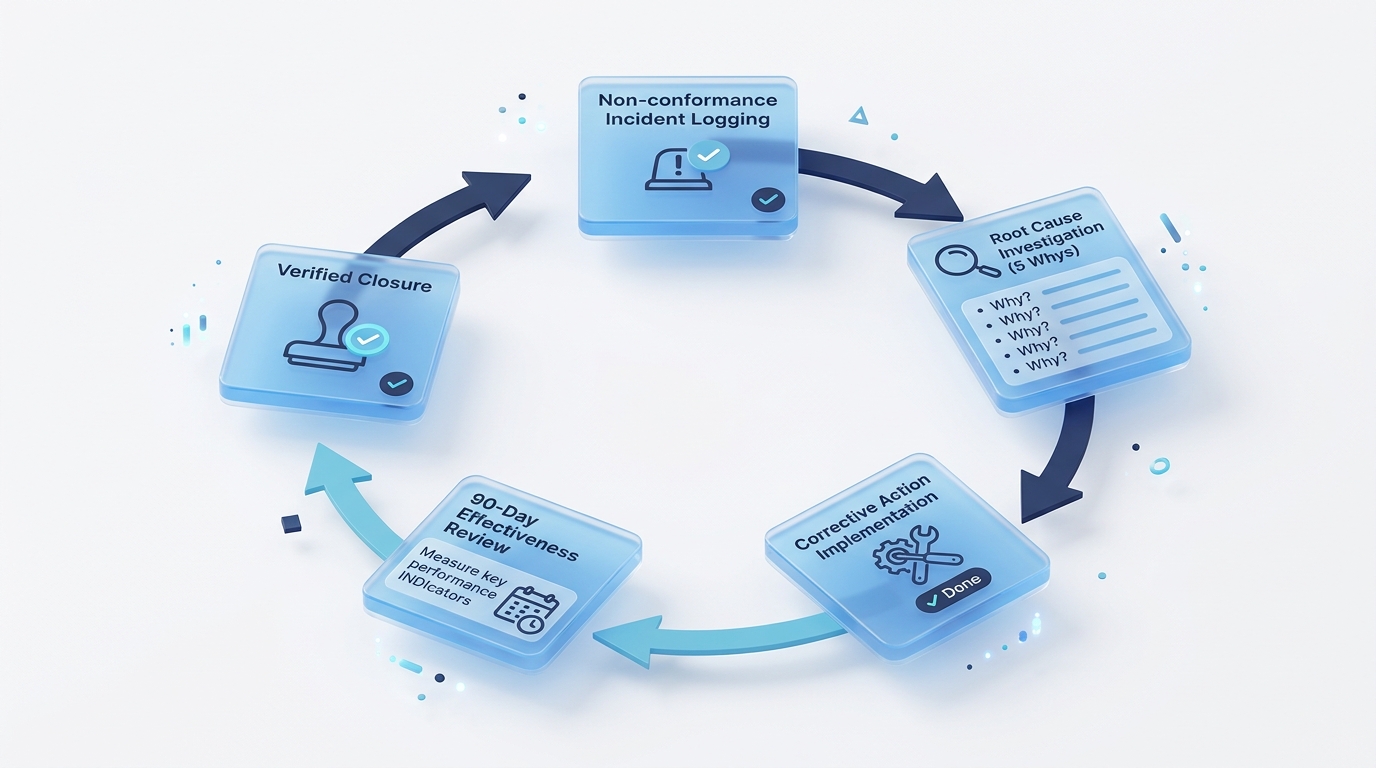
The 5-Stage Automated CAPA Lifecycle
Web/Mobile triage
5-Whys analysis
SOP & equipment fixes
Automated review
Zero defect proof
Here is how to design a bulletproof, automated CAPA workflow in M-Files that drives accountability, eliminates manual chasing, and guarantees audit compliance.
The 3 Fatal Flaws of Traditional CAPA Management
Before looking at the technical workflow, it helps to understand why traditional CAPA tracking fails:
1. Treating Symptoms as Root Causes
The most common error in incident investigations is accepting surface symptoms as the root cause. If an investigation report concludes “Root cause: Operator failed to follow Procedure B-12”, the resulting corrective action is almost always “Retrain operator on Procedure B-12.”
This completely ignores the systemic failure: Why was Procedure B-12 ambiguous? Why was the software UI misleading? Why did the operator have access to uncalibrated equipment?
2. Disconnected Actions & Lost Documentation
When a corrective action requires modifying an SOP, updating a technical drawing, and conducting staff retraining, those three tasks usually live in three separate places: Word drafts on a file server, training sheets in a binder, and the CAPA log in Excel. Linking evidence together during an audit requires hours of manual cross-referencing.
3. Missing Post-Closure Effectiveness Reviews
Deploying a fix is not the end of a CAPA; proving that the fix actually worked is mandatory. Without automated system reminders, quality managers almost never revisit closed CAPAs at 30, 60, or 90 days to verify whether non-conformances on that specific machine or process have dropped to zero.
Designing a Closed-Loop CAPA Workflow in M-Files
An effective M-Files CAPA Vault transforms quality management from a passive logging register into an active, automated workflow engine.
Here is the step-by-step lifecycle of an automated CAPA:
| Workflow State | Automated M-Files Action | Governance & Validation Checkpoint |
|---|---|---|
| State 1: Incident Ingestion | Staff logs an incident via web, desktop, or mobile. System assigns a unique ID (CAPA-2026-084) and links relevant asset/customer objects. | Initial severity triage; automatic escalation to Quality Manager if rated “Critical”. |
| State 2: Root-Cause Investigation | Workflow assigns an investigation task to the process owner with integrated 5-Whys and Fishbone prompt fields. | System blocks progression if the investigator submits single-sentence symptom write-ups. |
| State 3: Corrective Action Implementation | Automatically spawns linked Sub-Tasks (e.g. Revise SOP, Procure Guarding, Update Drawing) assigned to specific team members. | CAPA cannot advance until all child action tasks are marked complete by assignees. |
| State 4: SOP Revision & Training Handoff | M-Files routes the revised SOP for approval. Once approved, role-based training tasks are auto-generated. | Full traceability: CAPA record is permanently linked to the newly approved SOP version (v3.0). |
| State 5: Scheduled 90-Day Effectiveness Audit | System places the CAPA in a “Monitoring” state. At 90 days, M-Files generates a mandatory review task for the Quality Manager. | Quality Manager queries vault for repeat incidents on that asset. Only if zero recurrences are found can the CAPA be marked Verified Closed. |
Key M-Files Capabilities That Make CAPA Work Effortlessly
1. Object Relationships Over Isolated Folders
In M-Files, a CAPA is not a static document—it is a central Object connected dynamically to other business objects:
- Linked to the Customer or Supplier record.
- Linked to the specific Machine / Asset ID.
- Linked to the Standard Operating Procedure (SOP) that was modified.
- Linked to the Employee Training Records proving staff acknowledged the update.
When an auditor inspects CAPA-2026-084, clicking the relationship tree reveals the entire audit package in a single interactive view.
2. Automated Task Escalations
If an assigned investigation task sits un-actioned past its target deadline, M-Files automatically sends reminder notifications and can re-route the task to the Department Head if deadlines are breached.
3. Leveraging M-Files Custom Agents (Agentic AI)
With the release of M-Files Custom Agents, the CAPA workflow becomes even more supportive:
- Root-Cause Sanity Checks: The agent evaluates whether the stated root cause merely restates the symptom, prompting the investigator to investigate further before closure is permitted.
- Related Recurrence Checks: At the scheduled effectiveness review, the agent checks for related CAPA records associated with the same asset or process to highlight recurrence patterns.
The Business Payoff: Zero Audit Stress & Real Quality ROI
| Outcome Metric | Traditional Spreadsheet CAPA | M-Files Closed-Loop eQMS |
|---|---|---|
| Average CAPA Cycle Time | 60–120+ days (stalled in inboxes) | 14–21 days (automated task routing) |
| Audit Preparation Time | 20+ hours compiling evidence | Instant 30-second relationship view |
| Repeat Non-Conformances | Frequent (due to rushed root causes) | Near zero (enforced effectiveness checks) |
| Staff Accountability | Low (untracked email requests) | 100% digital audit trail & timestamps |
How Range Information Systems Helps You Deploy eQMS
Building an effective Quality Management System in M-Files requires deep understanding of both compliance standards (ISO 9001, ISO 14001, ISO 27001, AS/NZS 4801) and workflow architecture.
Range Information Systems works with quality managers and executive teams across Australia to:
- Map Custom Workflow States: Tailoring CAPA, incident, and non-conformance flows to your operational hierarchy.
- Configure Metadata Vaults: Setting up automated numbering, relationship trees, and digital signature permissions.
- Integrate with Existing Systems: Connecting M-Files with your ERP, CRM, and Microsoft Teams.
- Train Your Quality Team: Equipping staff to log, investigate, and close out quality records with minimal friction.
Summary: Turn Quality into a Competitive Strength
A robust CAPA system should not feel like administrative bureaucracy—it should be the engine that makes your products and services noticeably more reliable than your competitors. By automating the quality loop in M-Files, you ensure that every problem is fixed permanently, every procedure is kept current, and every audit is passed effortlessly.
- ✅ Closed-Loop Accountability: Never lose track of an open corrective action again.
- ✅ Root-Cause Depth: Enforce meaningful 5-Whys investigation standards.
- ✅ Integrated SOP Training: Connect procedural changes directly to employee competence records.
- ✅ Verified Effectiveness: Guarantee 30/60/90-day post-closure validation before final sign-off.
Ready to build a closed-loop CAPA workflow in your organisation?
Contact Range Information Systems for an eQMS consultation, or explore our Quality Management Software (QMS) solutions.
🔗 Related Reading: