
The Notifiable Data Breaches Scheme: What SMEs Must Do, and When
The 7:30 AM Alert: “We Think Customer Files Were Downloaded”
It is the call that no managing director, practice manager, or IT coordinator ever wants to receive:
“Our service desk detected an unauthorised foreign sign-in on our payroll coordinator’s Microsoft 365 account at 2:00 AM. Several OneDrive folders containing staff tax file numbers, client contact lists, and bank account details appear to have been synchronised to an external IP address.”
Once the immediate technical shock subsides, the board and executive leadership face an urgent legal and operational question:
Are we legally required to notify the Privacy Commissioner? Do we have to tell our clients? And how much time do we have before we face statutory fines?
In Australia, the answers are governed by Part IIIC of the Privacy Act 1988—known nationally as the Notifiable Data Breaches (NDB) scheme, overseen by the Office of the Australian Information Commissioner (OAIC).
Mishandling a data breach—or worse, concealing it in the hope that nobody notices—exposes Australian businesses to catastrophic reputational damage, commercial litigation, and civil penalties that can reach millions of dollars under recent statutory amendments.
Does the NDB Scheme Apply to Your Business? (The $3 Million Myth)
Many small business owners operate under a dangerous misconception: “Our business turns over less than $3 million annually, so the Privacy Act doesn’t apply to us.”
While the small business exemption generally excludes organisations with an annual turnover under $3 million, the legislation contains critical statutory carve-outs. Your business is strictly bound by the Privacy Act and the NDB scheme regardless of turnover if you:
- Provide health or medical services: Medical practices, allied health clinics, physiotherapists, psychologists, aged care providers, and child care centres.
- Are a registered NDIS provider: Any organisation handling National Disability Insurance Scheme participant records or support services.
- Handle Tax File Numbers (TFNs): Any entity holding employee or contractor TFN records is bound by the Privacy (Tax File Number) Rule 2015.
- Trade in personal information: Buying, selling, or bartering personal data without consent.
- Provide credit reporting or credit services: Commercial brokers, lenders, and debt collection agencies.
- Are a related body corporate: Any business owned by or affiliated with an entity with turnover over $3 million.
Even if you fall squarely outside the Act, tier-one corporate clients, government procurement contracts, and cyber insurance underwriters routinely mandate contractual adherence to the NDB scheme.
What Qualifies as an “Eligible Data Breach”?
Not every lost laptop or misaddressed email triggers a mandatory public notification. The law establishes three strict criteria that define an Eligible Data Breach (EDB):
- Unauthorised Access or Disclosure: There is unauthorised access to, or unauthorised disclosure of, personal information held by the entity (or information is lost in circumstances where unauthorised access is likely to occur).
- The “Serious Harm” Test: A reasonable person would conclude that the compromise is likely to result in serious harm to any of the individuals to whom the information relates. Under OAIC guidance, “serious harm” encompasses identity theft, financial fraud, reputational damage, psychological distress, humiliation, or physical threat.
- Failure of Remedial Action: The organisation has not been able to prevent the likely risk of serious harm with prompt remedial intervention.
The Crucial “Remedial Action” Exception
If a staff member accidentally emails a sensitive spreadsheet to the wrong client, but IT immediately contacts the recipient, receives written confirmation that the email was deleted unopened, and logs verified proof that no further dissemination occurred, the risk of serious harm has been neutralised. Under Section 26WF of the Privacy Act, prompt remedial action negates the breach from becoming notifiable.
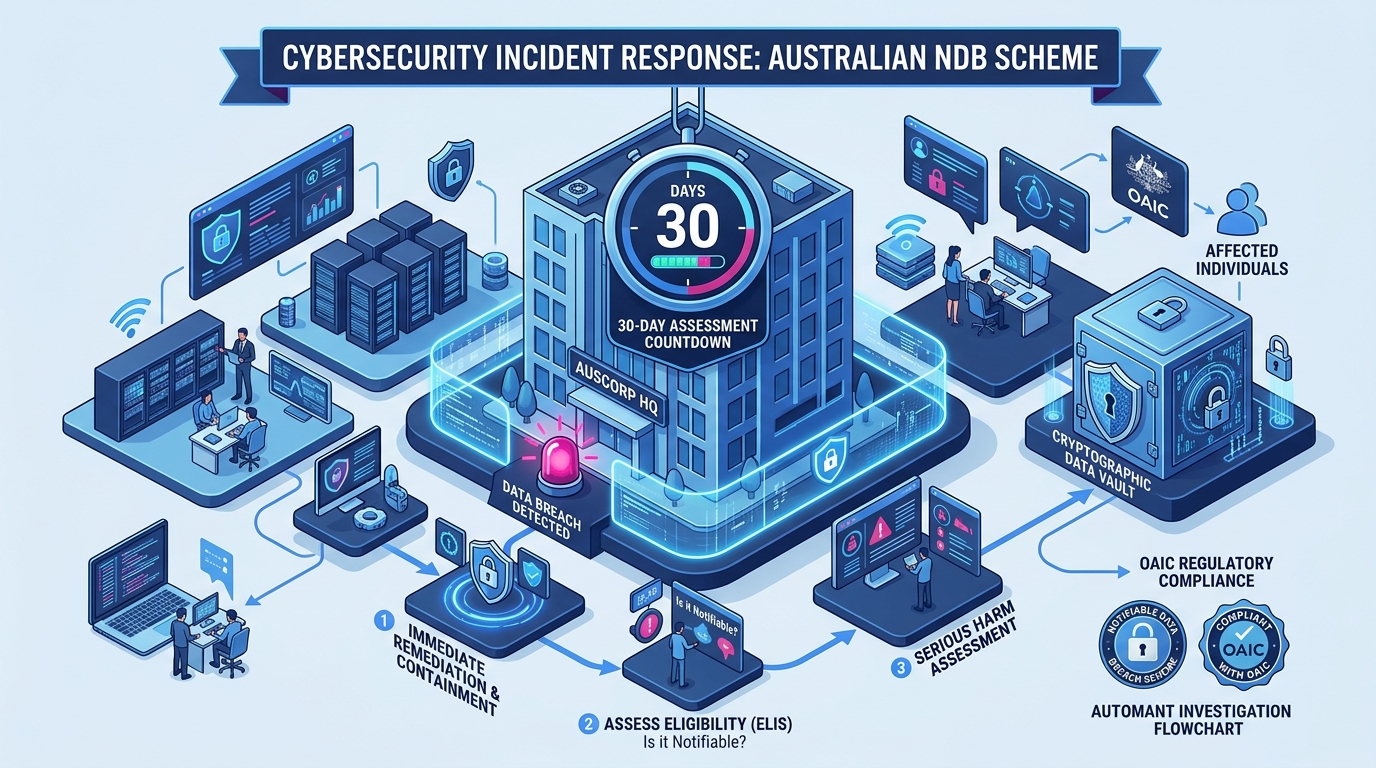
Visualising the NDB Decision Flowchart: From Suspicion to Notification
Understanding the regulatory clock is vital. When a breach is suspected, the law grants up to 30 calendar days to conduct a reasonable and expeditious assessment. Once the breach is confirmed as eligible, you must prepare a statement and notify the OAIC and affected individuals “as soon as practicable”.
The Australian NDB Decision & Notification Lifecycle
The First 72 Hours: An SME Incident Response Runbook
When a suspected breach unfolds, follow this structured runbook:
Step 1: Contain the Threat Immediately (Hours 0–4)
- Revoke All Active User Sessions: Disconnect user tokens via Microsoft Entra ID admin centre.
- Isolate Compromised Endpoints: Disconnect laptops from local networks and Wi-Fi to stop lateral movement.
- Disable Malicious Rules: Check for stealthy mailbox forwarding rules, transport rules, or newly created Entra application registrations.
Step 2: Preserve Critical Forensic Evidence (Hours 4–24)
Do not wipe machines or reinstall Windows immediately. Forensic investigators and cyber insurers need uncorrupted evidence:
- Export unified audit logs (UAL) from Microsoft Purview covering at least 90 days.
- Snapshot endpoint memory and disk state.
- Retain network firewall, VPN, and DNS query logs.
Learn how managed detection stops threats before data exfiltration occurs in our guide on MSP-led incident response for Australian businesses.
Step 3: Conduct the Harm Assessment (Hours 24–72)
Work with your IT provider and legal advisors to answer the statutory questions:
- What specific data categories were accessed? (e.g. general business email vs identity documents, Medicare numbers, or credit cards).
- Were the files encrypted at rest, and did the attacker obtain the decryption keys?
- Who are the affected individuals, and what real-world harm could arise if this data is released or sold?
Step 4: Prepare the Statement and Execute Notification
If serious harm remains likely:
- Notify the OAIC: Submit the formal Notifiable Data Breach statement using the OAIC online portal.
- Notify Affected Individuals: Communicate directly via email, letter, or phone. The notification must include:
- The identity and contact details of your organisation.
- A clear description of the breach.
- The kinds of information exposed.
- Specific recommendations on what steps individuals should take to protect themselves (e.g. contacting IDCARE, placing credit bans via Equifax/Illion, changing banking passwords).
How Range IT Keeps Your Business Secure and Audit-Ready
Preventing data breaches and satisfying OAIC compliance mandates requires continuous technical vigilance. At Range IT, we equip Australian SMEs with enterprise-grade defensive infrastructure:
- 24x7 Threat Hunting & EDR: Proactively detects unauthorised sign-ins and mass file exfiltration before data leaves your boundary.
- Immutable Log Archiving: Preserves tamper-evident Microsoft 365 and firewall telemetry required by forensic assessors and insurers.
- Compliance Alignment: Learn how our Cybersecurity and Compliance services align your business with the ACSC Essential Eight.
- Governance Systems: Discover how our document solutions at Range IS Document Governance prevent sensitive file sprawl.
Is your incident response plan ready for an unexpected breach? Contact the Range IT Incident Team today to audit your security posture and data retention policies.