
M-Files for Tax & Accounting — Every Engagement, Organised and Secure
Organise client work around the engagement, not a folder tree. Documents, tasks, reviews and approvals sit together, clients upload through a branded portal instead of email, and sensitive records stay governed from request to retention.
Engagement-centric workflows · Branded Hubshare portals · Review gates · e-Signature
Access follows role, service line and engagement. Audit trails cover documents, tasks and approvals.
294%
Up to ROI
Return on investment reported by M-Files for accounting and tax advisory firms
50%
Faster Searching
Improvement in finding documents and information, as reported by M-Files
65%
Faster Filing
Reduction in time spent filing documents, as reported by M-Files
70%
Workflow Efficiency
Improvement through automated tasks, reviews and approvals
Figures are published by M-Files and are not specific to any one practice. Results vary by organisation.
Sound familiar?
Four pressures that build up in every Australian accounting practice, and peak at lodgement time.
Tax returns sent as email attachments
Financial statements, TFNs and bank details travel as attachments and sit in inboxes for years. One mistyped address can become a notifiable data breach.
Workpapers scattered everywhere
Source documents live in local folders, practice software and personal drives. Finding last year’s working paper takes a search party.
Reviews that depend on memory
Who has prepared, who has reviewed and what is waiting on the partner is tracked in spreadsheets, so work stalls quietly.
Chasing clients for documents
Staff spend peak season sending reminders for dividend statements, bank summaries and signed declarations, then re-filing what arrives.
Four capabilities for a modern practice
M-Files for Tax Advisory connects documents, tasks, clients and team members so work moves without anyone chasing it.
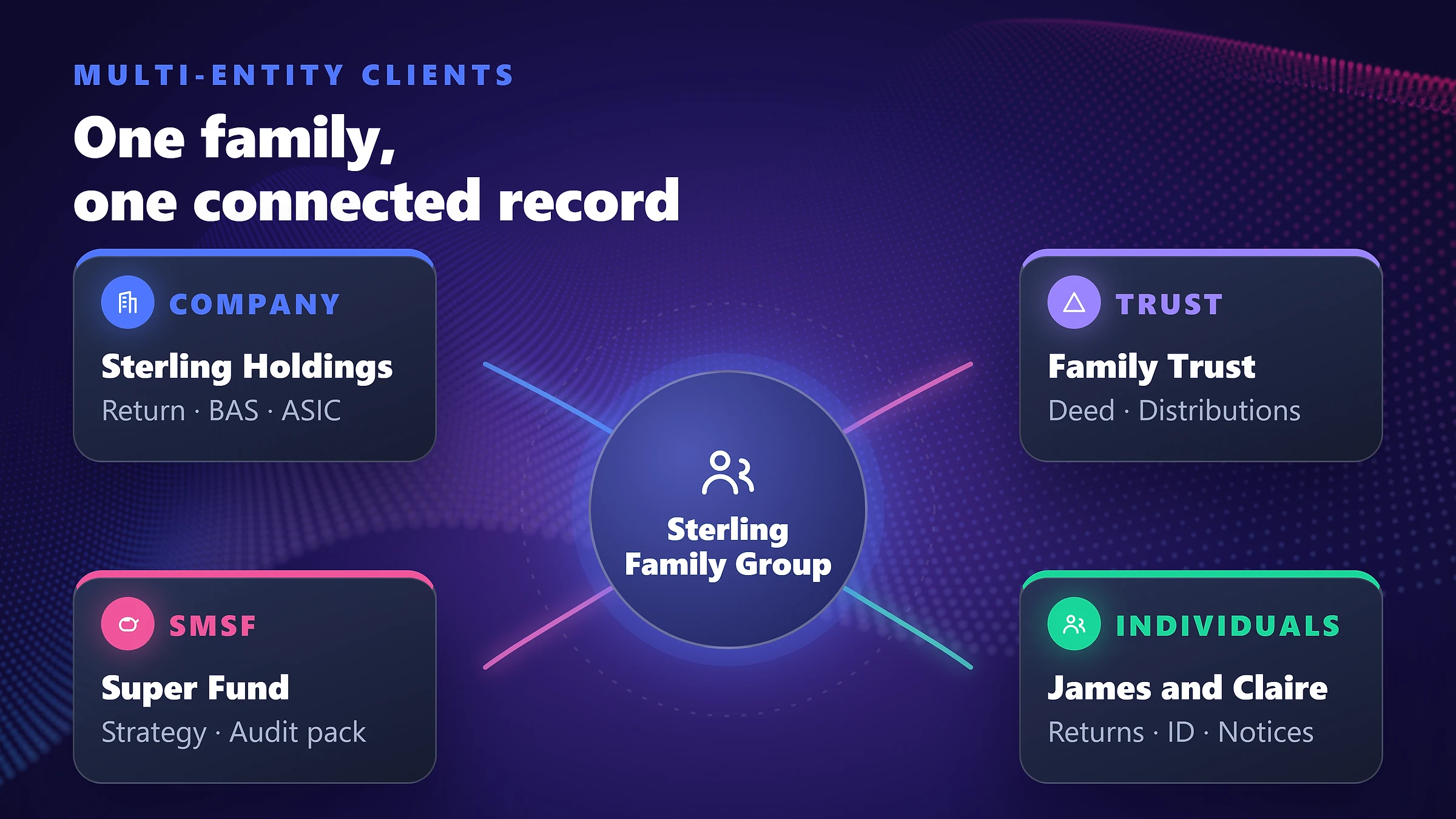
Engagement-centric organisation
Each engagement brings together the client, entities, financial year, documents, tasks and team. Drag and drop to file, search across everything, and let M-Files Aino summarise a document or suggest the next step.
- ✓Structure by client, entity (individual, company, trust, SMSF) and financial year
- ✓One source of truth with automatic version control
- ✓Document templates linked to client and engagement data
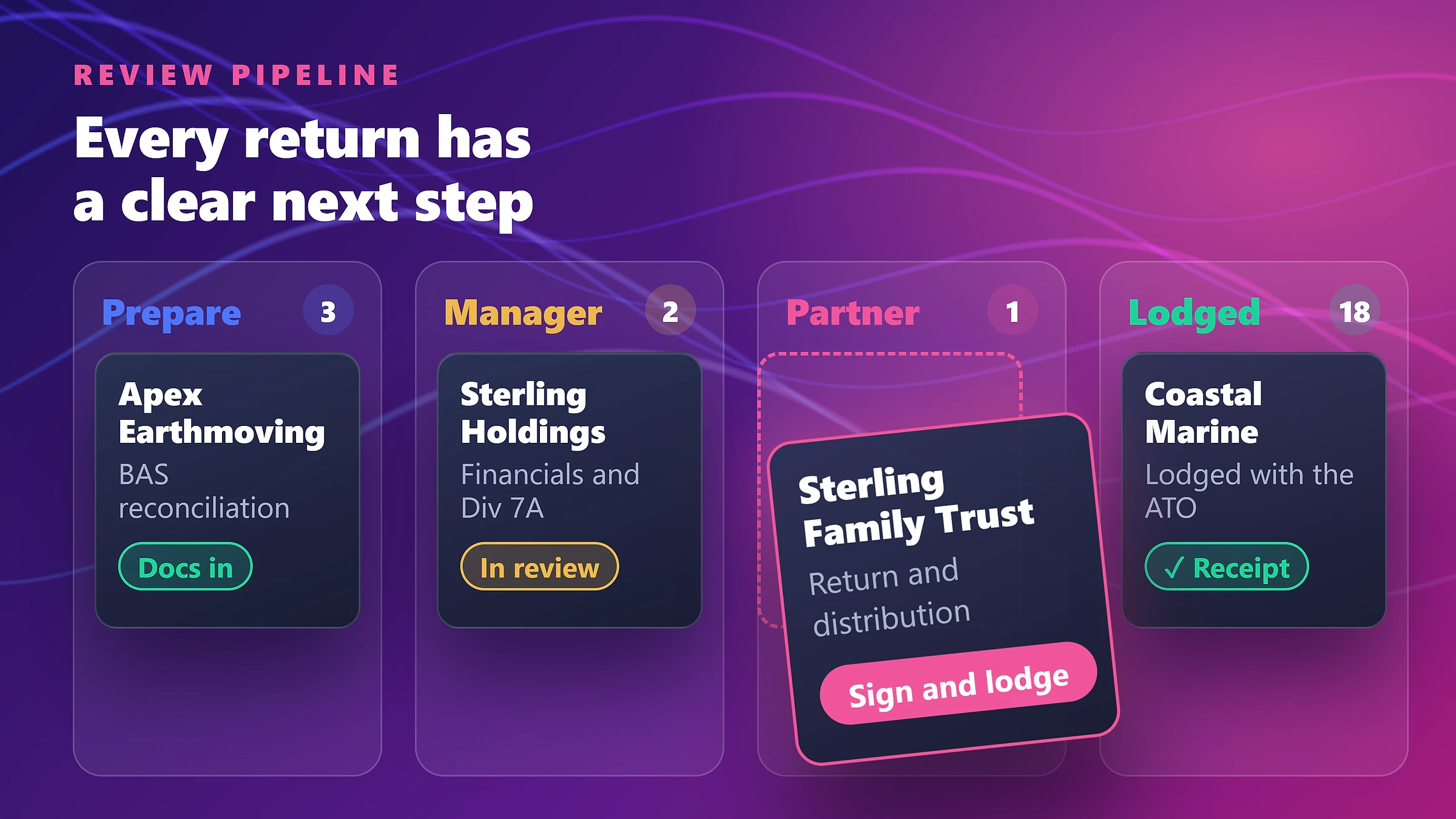
Review workflows that run themselves
Design tasks, reviews and approvals with a no-code visual designer. Work is routed from preparer to manager to partner, with clear status at every stage and co-authoring in Microsoft 365.
- ✓Automatic routing to the right reviewer by service line or expertise
- ✓Overdue and waiting-on-client indicators for the whole team
- ✓Integrated e-signature for engagement letters and declarations
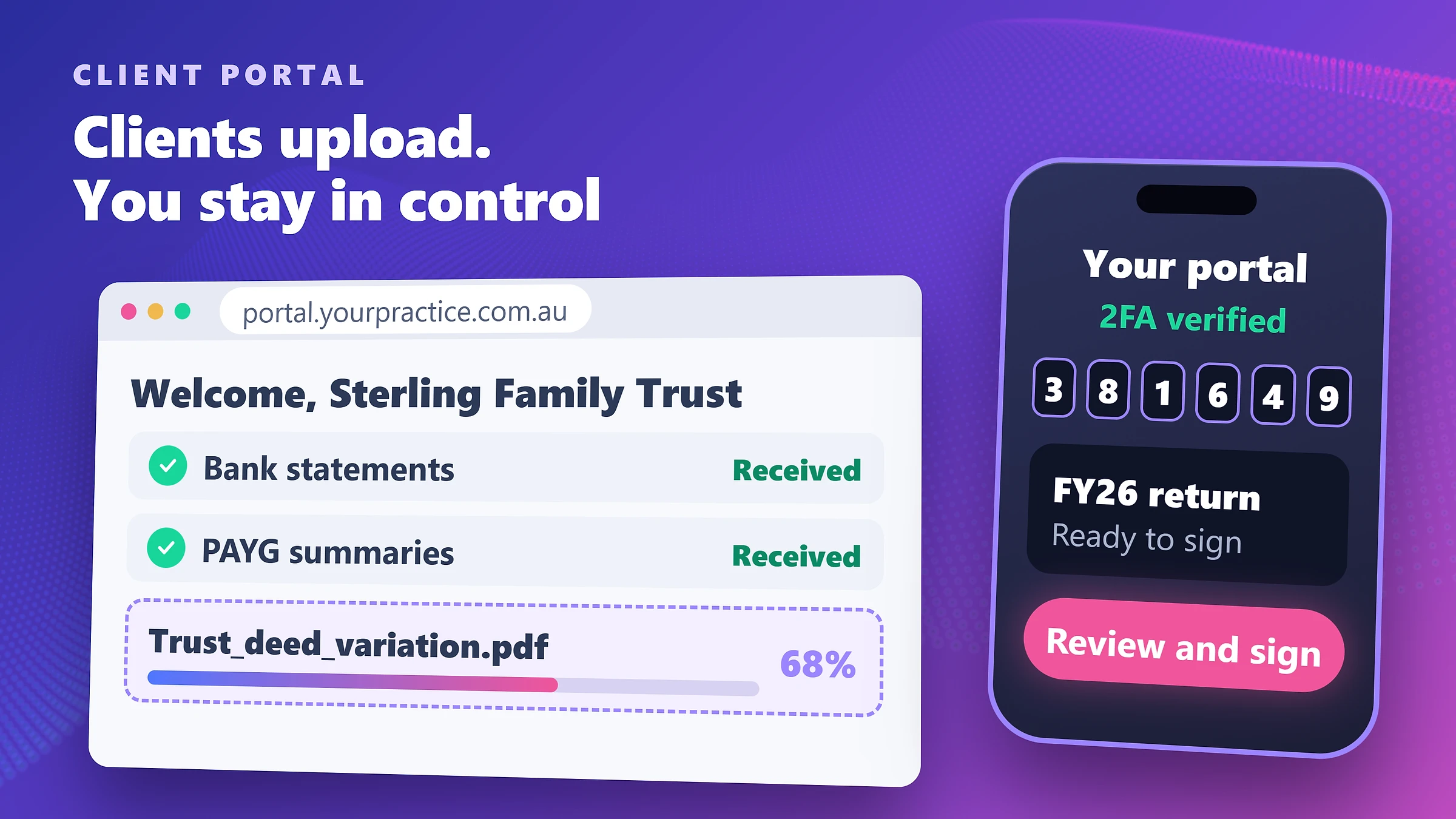
Branded client portals with Hubshare
Replace email with a secure portal that carries your practice’s name. Clients see a checklist of what you need, upload directly into their private space and sign when ready.
- ✓Secure collaboration for documents, requests and approvals
- ✓Uploads land in the right client and year automatically
- ✓No need for clients to install or learn a document system
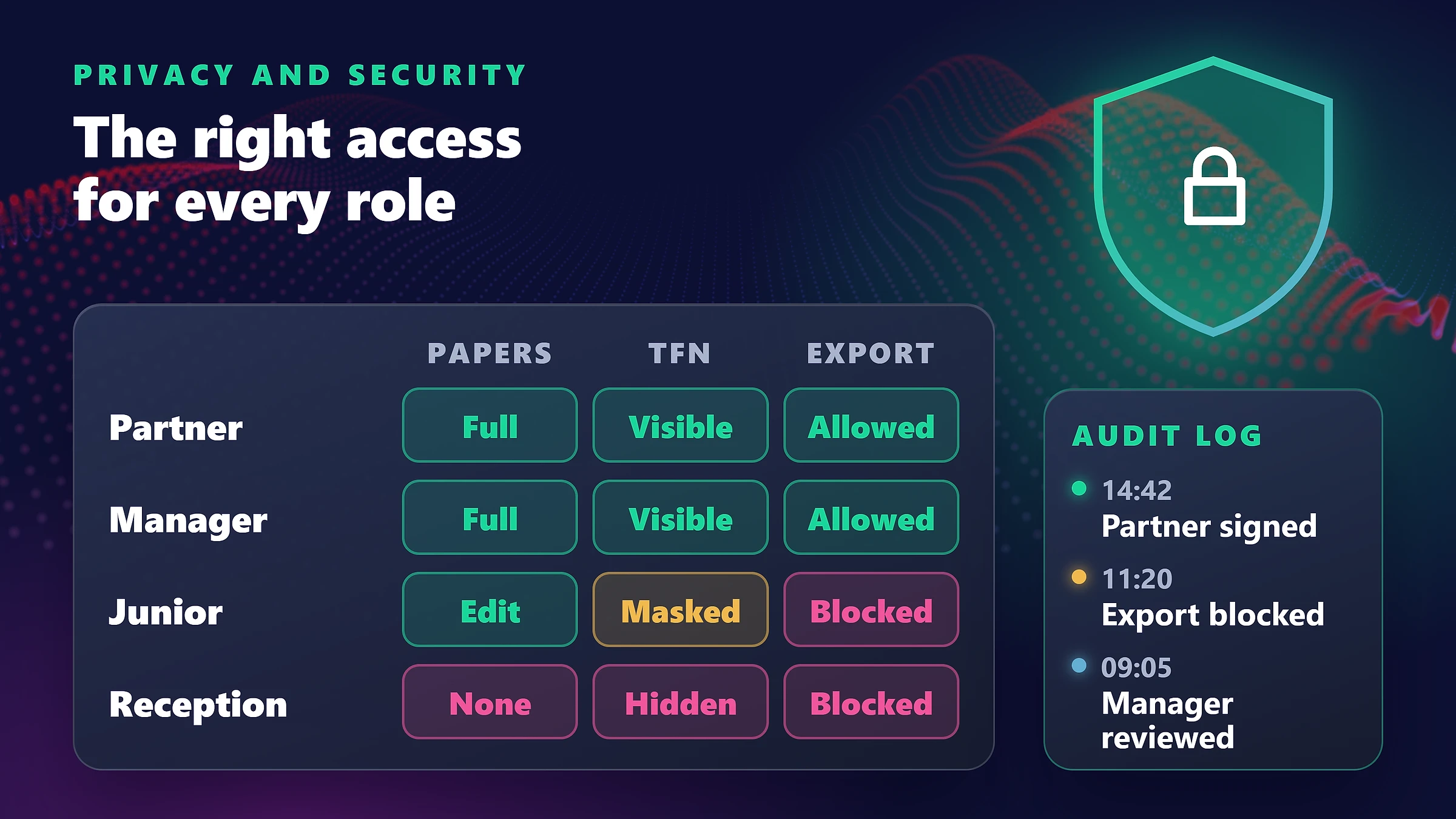
Security, retention and privacy by design
Access follows role, service line and engagement, so staff see only what they should. Audit trails cover documents, tasks and approvals, and retention controls help keep records for the period required.
- ✓Supports Australian Privacy Principle 11 obligations to secure personal information
- ✓Automated retention and records controls by document class
- ✓Supports your obligations under the Tax Practitioners Board Code of Professional Conduct
From engagement letter to lodged return
The vault models the shape of practice work. Range adapts stages, roles and templates to your services.
- Step 1
Onboard
Create the client, entities and engagement from a template. Send the engagement letter for e-signature.
- Step 2
Collect
The client receives a portal checklist and uploads source documents, filed straight to the right year.
- Step 3
Prepare
Preparers build workpapers against the engagement with version control and co-authoring.
- Step 4
Review
Work moves through manager and partner review gates, with comments and approvals logged.
- Step 5
Approve and retain
The client approves in the portal. Final records are locked and retained under your rules.
What is included in the Ready-to-Deploy vault?
A practice-ready starting point that Range adapts to your services, staff structure and software.
✓ Client and entity structure
Clients, family groups and entities such as individuals, companies, trusts and SMSFs, linked to engagements by financial year.
✓ Engagement and workpaper classes
Engagement letters, workpapers, source documents, correspondence and returns with the metadata your team filters by.
✓ Preparer to partner workflow
Configurable review gates with task assignment, status tracking and escalation.
✓ Hubshare client portal
A branded portal with document request lists, uploads and approvals, configured with your logo and colours.
✓ Security and retention rules
Role, service-line and engagement-based permissions, audit trails and retention policies by document class.
✓ Integrations
Microsoft 365 co-authoring, DocuSign and Salesforce are supported. Links to your practice management software are scoped with Range.
Retention periods depend on the record type and your obligations. Range configures the rules you specify and recommends you confirm them with your professional advisers.
Why move beyond email and shared drives?
Most practices already own capable tools. The gap is the governed layer that connects them.
| Capability | Email, shared drives and spreadsheets | M-Files for Tax Advisory |
|---|---|---|
| Receiving documents | Email attachments, re-filed by hand | Portal uploads filed to the right client and year |
| Client structure | Folders per client, inconsistent naming | Clients, entities and engagements linked as records |
| Review tracking | Spreadsheet or memory | Workflow with status visible to the whole team |
| Signatures | Print, sign, scan, email back | e-Signature with the executed copy filed automatically |
| Access control | Folder permissions that drift | Access by role, service line and engagement |
| Retention | Manual clean-ups, or never | Rules applied by document class with an audit trail |
We configure it around your practice
Range supports Australian professional services firms and understands the rhythm of the lodgement calendar.
Map your services
We review service lines, entity types, review stages and how work flows today.
Configure and brand
We set up the vault, workflows and Hubshare portal, including your practice branding.
Migrate and connect
We bring in existing client records, and connect practice management software as scoped.
Onboard staff and clients
Short, role-based training for your team, plus simple guidance for clients to use the portal.
“We’ve been working with Range IT for over six years and have been consistently impressed with their service. Their document management system has been a great fit for our business, and their team is always responsive, professional, and willing to help with custom solutions. We highly recommend Range IT.”
Annabel
Executive Assistant to Henry Bateman — Cornerstone Health

Gartner Magic Quadrant
Leader & Visionary in Enterprise Content Services
Forrester TEI Study
Validated 301% ROI over 3-year enterprise horizon
Nucleus Research
Ranked Leader 10+ consecutive years for usability
Certified Partner
Range is an Australian M-Files partner since 2012
Questions about M-Files for Tax & Accounting
Answers for managing partners, practice managers and tax directors.
1. What is M-Files for Tax & Accounting?↓
2. What should an accounting practice look for in document management software?↓
3. How do clients send us documents?↓
4. Can it handle family groups, trusts and SMSFs?↓
5. Does it support our preparer, manager and partner review process?↓
6. How does it help us meet our privacy obligations?↓
7. Will it work with our practice management software?↓
8. How long do we need to keep records?↓
9. How long does deployment take?↓
Go deeper on practice security and efficiency
Guides on client portals, data breach obligations and fraud controls.
M-Files for Tax Advisory: Portals, Workpapers and Compliance
How a governed client portal replaces insecure email for tax work.
Notifiable Data Breaches Scheme for SMEs
What counts as an eligible data breach and how to prepare.
Document Management for Accounting Firms
The broader document management use case for professional services.
Take the detail with you
Choose the PDF you want and we will email it straight to your work inbox, ready to share with your team.
Email me the PDF
FreeWe will send the PDF you selected to your work inbox.
Ready to retire insecure email from your practice?
Book a 30-minute walkthrough of M-Files for Tax Advisory with Range’s Australian information specialists. We will show it against your own client and review process.